About this offer
One for anyone who learnt Adobe back when you could buy a copy, and now feels stuck paying monthly because of years of muscle memory and a hard drive full of old projects.
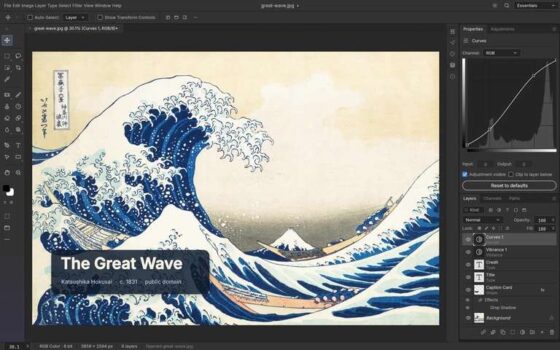
ArtCraft has seven free, open-source desktop apps covering the main Adobe workflows. What caught my eye is how deliberately familiar the interfaces look. Changing software is much more appealing when you dont have to spend the first afternoon hunting for tools. PhotoCraft keeps many familiar Photoshop shortcuts, so years of muscle memory should still come in handy.
They run locally, with Windows, Mac and Linux downloads listed. These are early builds, so expect missing features and bugs while development continues. Details and downloads.
The full line-up
PhotoCraft Photoshop-style image editing, with layers, masks, adjustment layers, brushes, text and layered PSD/PSB support.
VectorCraft Illustrator-style vector work, including pen tools, shapes, gradients, editable effects, image tracing and SVG/PDF support.
PdfCraft Acrobat-style PDF tools, including content editing, forms, annotations, redaction and page organisation.
FilmCraft Premiere-style video editing, with a timeline, trimming, transitions, colour controls, keyframes and audio mixing.
LightCraft Lightroom-style photo management and RAW development, with non-destructive adjustments and masks.
EffectCraft After Effects-style animation and compositing, with layers, keyframes, expressions, effects, cameras and lights.
DesignCraft InDesign-style publishing, with multi-page layouts, linked text frames, paragraph styles, text wrapping and PDF output.
The Acrobat alternative is worth a closer look
Free PDF viewers are everywhere. Being able to change whats actually in a PDF is the useful bit for anyone paying for Acrobat.