


As an Amazon Associate, I may earn from qualifying purchases.
**Price and promotions are accurate at the time of posting but can change or expire at anytime.**
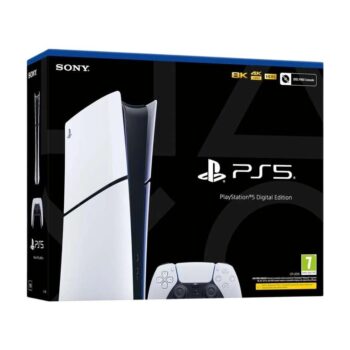
The PS5 Digital Edition unleashes new gaming possibilities with ultra-fast performance, immersive features, and next-generation visuals. As an all-digital version of the PS5 console with no disc drive, it delivers the full PlayStation experience through digital downloads. Sign in to your PlayStationNetwork account and access PlayStationStore to purchase and download your favourite games. The slim CFI-2100 model provides a compact, lightweight design while maintaining full PS5 functionality and compatibility.
Good to know
All-digital version of the PS5no disc drive included.
Ultra-high-speed SSD enables lightning-fast loading and fluid gameplay.
Supports haptic feedback and adaptive triggers for a more immersive feel.
3D Audio³ enhances spatial sound for supported games.
Backwards compatibility with thousands of supported PS4 titles.
Slim CFI-2100 model: lighter, more compact, updated design.
Compatible with PS5 accessories for CFI-2000 series, including Disc Drive (sold separately).
Why we love it
The PS5 Digital Edition offers the full power of PlayStation in a clean, minimalist all-digital format. With no discs to manage, everything is streamlinedfast downloads, instant access to your library, and simple, modern setup. Combined with the incredible SSD speed, next-gen immersion and refreshed slim design, its perfect for players who prefer a pure digital ecosystem.
Safety Warning
Use only as intended and according to the manufacturers instructions. Keep out of reach of young children to prevent injury or accidental damage. Do not attempt to disassemble, modify, or repair the console. Avoid exposure to moisture, extreme temperatures, or direct sunlight. Ensure adequate ventilation around the console to prevent overheating. Unplug the console before cleaning or maintenance.
Usage Instructions
Place the Sony PlayStation 5 Digital Edition Slim console on a stable, flat surface with adequate ventilation.
Connect the console to your display (TV or monitor) using the supplied HDMI cable.
Plug in the power cable and connect to a suitable power outlet.
Power on the console using the front power button.
Follow the on-screen instructions to set up your user account, Wi-Fi, and preferences.
Download games and apps from the PlayStation Store, as this digital edition does not use discs.
Use the controller to navigate menus and play games.
Shut down the console properly before unplugging or moving it.
Clean the exterior with a soft, dry cloth do not use liquids or abrasive cleaners.
Store the console in a cool, dry place when not in use.
Refer to the user manual or PlayStation support website for detailed instructions, troubleshooting, and recommended maintenance.