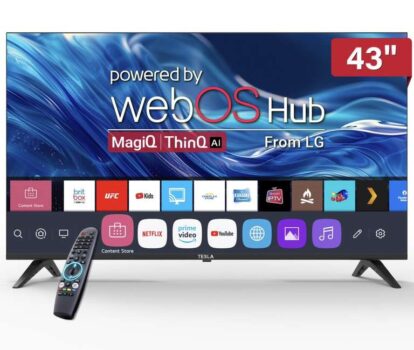
TESLA 43 Direct LED 4K HDR Smart Web OS TV – T43S4K, Freeview HD, Dolby Audio & Free TV Wallmount Bracket


As an Amazon Associate, I may earn from qualifying purchases.
**Price and promotions are accurate at the time of posting but can change or expire at anytime.**
The Tesla 43 4K UHD Smart TV with Web OS combines a crisp, high-resolution display with smart functionality and a clean, modern design making it a practical choice for living rooms, apartments, or home-theatre setups. With its 4K resolution and built-in Web OS platform, it delivers a great balance of picture quality, ease of use, and everyday functionality for streaming, TV watching, gaming, and more.
43 4K UHD (3840 2160) resolution sharp, detailed image quality for films, shows, and games
Web OS smart platform built-in operating system giving access to streaming apps and smart-TV features
3 HDMI 1 USB ports connect consoles, media players, or external drives
Built-in Wi-Fi stream content and apps without extra devices
Standard built-in speakers adequate for everyday viewing
Slim, modern design blends well into most living rooms
Usage Instruction:
Unbox the TESLA 43 Direct LED 4K HDR Smart Web OS TV and place it on a stable surface or mount it on the wall using the provided mounting kit.
Connect the TV to a power source and turn it on.
Follow the on-screen instructions to set up the TV, including connecting to Wi-Fi and signing into your account for the Web OS platform.
Use the remote control to navigate through the Web OS interface and access streaming services, apps, and settings.
Connect external devices such as gaming consoles, Blu-ray players, or sound systems using the HDMI ports.
Adjust picture and sound settings to your preference using the TVs menu.
For optimal viewing, dim the lights in the room or use the TV in a dark environment.
Regularly update the TVs software to ensure you have the latest features and security patches.
When not in use, turn off the TV to conserve energy.
Safety Warning
Ensure the TV is installed on a level surface or securely mounted to prevent tipping over.
Do not block the ventilation slots to prevent overheating.
Keep the TV out of reach of children to avoid any potential hazards.
Do not attempt to repair the TV yourself contact a professional for any repairs.
Ensure the TV is properly grounded to prevent electric shock.
Avoid placing the TV near water or in humid environments.
If the TV is not working properly, unplug it and contact the manufacturer or a professional for repair.
Always follow the manufacturers instructions for use and maintenance to ensure safe operation.
Child Safety Instructions
Not suitable for children to operate without adult supervision.
Ensure the TV is securely placed or mounted to prevent tipping.
Keep remote controls and other small parts out of reach of children to avoid choking hazards.
Supervise children closely if they are in the same room as the operating TV.
Teach children the importance of not touching the screen or any other part of the TV while it is in operation.