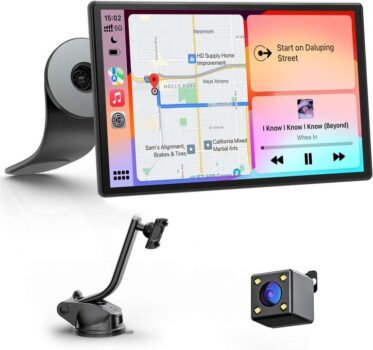
Avylet 9 Wireless Car Stereo with Apple Carplay & Android Auto, OTA – Sold by Avylet-QWH-UK / FBA


As an Amazon Associate, I may earn from qualifying purchases.
**Price and promotions are accurate at the time of posting but can change or expire at anytime.**
Free shipping
How to Fix Android Auto Disconnection IssuesIf you experience unstable connection or frequent disconnections with Android Auto after upgrading your phone to Android 16, dont worry We have released a firmware update (via OTA) to effectively resolve this issue Please follow the steps below to complete the setup: 1. Uninstall EveLink APP from your phone and download the latest version 2. Switch to SuperLink-Android mode on the smart screen Connect to the smart screen 4. Once connected, if your phone displays Android 16 Auto Connect issue Fixed, this indicates that the issue has been successfully resolve If needed, reach out to us, and we will provide a video guide
Hands-free Voice Control & GPS NavigationControl Siri or Google Assistant via voice command for safe operation while driving. Navigation is provided via your smartphone with real-time traffic information, allowing you to enjoy entertainment and make your journeys more efficient at the same time
Portrait and Landscape ModeThe Avylet car play screen offers flexible portrait and landscape mode support and is ideal for navigation, music and apps. The apple car play screen is particularly suitable for large vehicles such as SUVs, trucks, jeeps and motorhomes, providing an uninterrupted visual experience both on the road and in off-road environments
Flexible Magnetic Suction Mount, Easy to Remove and InstallThanks to the magnetic and suction mount, the android auto screen can be installed quickly and flexibly. With 360-degree rotation and 180-degree tilt, you can easily adjust the screen to find the best viewing angle to suit your needs. This allows you to enjoy maximum flexibility and comfort while driving.Portable CarPlay is easy to remove ideal for travelling, in a rental car or when camping. Enjoy your favourite videos outside the car.
Custom Start Logo & OTA UpdatesPersonalise your start screen for free simply send us your desired image to serviceavylet.com. Thanks to wireless OTA updates, your carplay will always be up to date: Enjoy ongoing optimisations, new features and smooth operation without manual installation
Reversing Camera with Parking AidThe IP67 waterproof camera provides reliable assistance when reversing. Connect the red cable to the reversing light the image appears automatically when reverse gear is engaged. (Note: The camera is intended solely as a parking aid and does not record images.The length of the rear camera cable is 19.7 FT.)
Split Screen & Ultra-clear DsplayThe high-resolution 9-inch touchscreen (1024×600) delivers a crisp, responsive display. Thanks to the split-screen function, you can keep an eye on navigation and music at the same time–ideal for Apple CarPlay & Android Auto. (Note: Use the Type-C port on your car charger to avoid reboots.)