
As an Amazon Associate, I may earn from qualifying purchases.
**Price and promotions are accurate at the time of posting but can change or expire at anytime.**
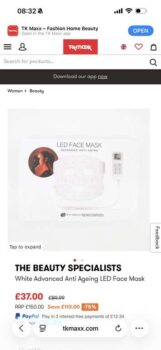
Rio LED Face Mask
Light-powered skincare for visible results. The Rio LED Face Mask offers anti-ageing, acne-fighting, and skin-boosting light therapy at home.
The Rio LED Face Mask blends advanced skincare technology with comfort and ease, giving you a full facial treatment without
stepping into a salon. Using a combination of red, blue, and near-infrared light, this wearable device is designed to target a range of skin concernsfrom signs of ageing to blemishes and tired complexions.
Red and NIR lights work together to promote collagen and reduce wrinkles, while blue light actively combats the bacteria responsible for acne. With adjustable intensity and quick
treatment times, it fits effortlessly into your self-care routine.
Clinically tested and FDA cleared for wrinkle treatment, its safe, effective, and made to deliver visible results in weeks.
Reduces appearance of fine lines and wrinkles.
Helps clear blemishes and acne-causing bacteria.
Encourages natural collagen production.
Revitalises dull, tired skin.
Safe, non-invasive, and FDA cleared.
Suitable for most skin types.
Red (650nm), Blue (410nm) & NIR (850nm) LED therapy.
96 LED lights in a flexible, skin-hugging mask.
4 treatment modes and 3 intensity settings.
525 minute treatment durations.
USB rechargeable with remote control.
How to useBefore each session, ensure the LED Face Mask is powered off and clean.
Refer to the cleaning section on the next page for detailed instructions.
The mask is equipped with adjustable head straps for a secure and
comfortable fit:
1. Insert the straps through the slots
located on each side of the mask.
2. Wrap the straps around your head
and fasten them using the provided
hook-and-loop system. Adjust for
comfort and stability.
3. Insert Lead from the LED Face
Mask into the Controller.
TREATMENTS
To achieve optimal results, it is recommended to use the LED Face Mask
consistently over several weeks. Begin with 3 to 5 sessions per week for the first 6 weeks. Adjust frequency based on your skins sensitivity and your skincare routine.
1. Press the On/Off button to turn on the mask. The default mode (Mode 1:
Red Near-Infrared Light) will activate automatically.
2. To select a light mode, press the Mode button to cycle through the four
treatment options:
Mode 1: Red Near-Infrared Light (17minutes maximum)
Mode 2: Red Light Only (25minutes maximum)
Mode 3: Blue Light (20minutes maximum)
Mode 4: Red Blue Light (20minutes maximum)
3. To adjust the intensity, use the Intensity or Intensity buttons to
set brightness (Levels 13). Start at a lower intensity and increase based
on comfort.
4. To set a treatment time, press the Time or Time buttons to
adjust session duration in 5-minute increments. The timer screen will
countdown and the mask will automatically turn off once the treatment
time has finished.
Note: Each mode has specific maximum time limits – see above.
5. Once the session ends, remove the mask, turn off the device, and apply
your regular moisturiser and sunscreen