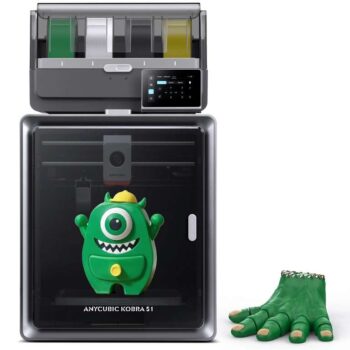
ANYCUBIC Kobra S1 Combo 3D Printer 250250250mm Printing Speed up to 600mm/s – Welcome Offer In App


As an Amazon Associate, I may earn from qualifying purchases.
**Price and promotions are accurate at the time of posting but can change or expire at anytime.**
Detailed Product Description
The Anycubic Kobra S1 Combo – JOYBUY Version is a high-performance multi-color 3D printing system designed to deliver speed, precision, and exceptional ease of use. Suitable for beginners and professionals alike, this advanced, low-noise, and high-stability machine works in two powerful ways: it prints vivid multi-color models with remarkable clarity while maintaining consistent accuracy at high speeds. Its intelligent calibration system ensures smooth first layers and reduces printing errors, while the reinforced CoreXY structure enhances precision even on complex builds. Key technologies such as AI spaghetti detection, dynamic flow compensation, and a 320C quick-swap hotend improve reliability, enabling smoother surfaces, richer colors, and more stable performance. Paired with the ACE Pro system, it offers fast, seamless color switching for impressive creative freedom, resulting in clean details, efficient workflows, and stunning multi-color prints.
Product Specification
Specification Description
Brand Anycubic
Product Name Kobra S1 Combo Joybuy Version
Multicolor Printing Supports 4- or 8-color printing
Printing Volume 250 250 250 mm³
Supporting Filaments PLA, PETG, TPU, ABS, ASA
Printing Speed Recommended 300 mm/s, Maximum 600 mm/s
Acceleration Recommended 10,000 mm/s², Maximum 20,000 mm/s²
Nozzle Specs Max Temperature 320C, Diameter Standard 0.4 mm, expandable to 0.6 / 0.8 mm
Hotbed Specs Max Temperature 120C, Material PEI spring steel build plate
Firmware Solution Kobra OS
Construction CoreXY
Extrusion Type Short distance extrusion
Motion System X-axis Linear rod
Motion System Y-axis Linear rod
Motion System Z-axis Single motor with three guide poles
Machine Leveling LeviQ3.0 Auto-leveling, Z-Offset
Pressure Advance / Flow Calibration Supported
Power Loss Resume Supported
Filament Detection & Auto Resume Supported
Filament Entanglement Detection Supported
AI Spaghetti Detection Supported
Object-Skip & Area Leveling Supported
Control & Print Methods Via printer, slicing software, Anycubic APP, USB (print only)
Touchscreen 4.3-inch capacitive touch screen
Noise 46 dB (Standard mode) 44 dB (Quiet mode)
Video Monitoring Standard HD camera, supports 480P
Multilingual Support EN / CN / DE / FR / IT / ES / RU / JP / KO
Machine Weight Kobra S1: 18 kg, ACE Pro: 4.6 kg
Package Weight 25.9 kg
Machine Dimensions Kobra S1 Joybuy Version: 400 410 490 mm³, ACE Pro: 365.94 282.84 234.5 mm³
Package Dimensions 490 484 593 mm³
Manufacturer Shenzhen Anycubic Technology Co., Ltd
Email official
Manufacturers Address
101-501, Bldg 11, Yinhai Industrial Park, Yinhe Community, Yuanshan Str., Longgang District, Shenzhen, China
Instructions for Use
Quick Start Steps Unlocking ACE Pro
1.Open the printer cover and use the H2.5 Allen key to remove the two red-marked screws (as shown in the illustration).
2. After completing the above steps, remove the ACE Pro from above. It is sufficient to loosen the screws you do not need to remove them completely.
3. Remove the accessory set from the housing by sliding it out from the top.
4. Using the arrows as a guide, remove the four screws marked with red circles with the H2.5 Allen key. It is sufficient to loosen the screws there is no need to remove them completely.
5. Remove the ACE Pro cushion.
— Print Head Unlock
1. Cut the tie that secures the print head and remove the print head protective cover.
2. Remove the foam rubber.
— Hotbed Unlocking Follow the arrows and use an Allen key of H2.5 to remove the three screws marked with red circles.
— Install Spool Holder (skip if printing multiple colors) Attach the spool holder using M36 screws from the accessory pack.
— Install ACE Pro
1. Place the ACE Pro on top of the Kobra S1.
2. Connect the 4-pin end of the signal cable to the printer and the 6-pin end to the port in the lower-left corner of the ACE Pro.
3. Attach the filament module to the back of the printer using M2.525 screws, and insert the cable into the port (use H2.0 Allen key).
4. Insert the hanging filament tube into the port.
5. Insert all four Teflon tubes into the filament holder. Note: Insert the Teflon tubes all the way.
6. First, remove the four blue clips from the connection ports of the Teflon tubes.Insert the Teflon tubes into the ports and then secure them back in place with the four blue clips (Note: the Teflon tubes are randomly assigned).
7. After completing the above steps, use the power cable to supply power to the printer and the ACE Pro.
— Active Carbon Installation Remove the active carbon from the accessory box, tear open the vacuum seal, and insert it into the printers filter box.
Safety Warnings
1. The 3D printer from AnyCubic generates high temperatures. DO NOT PUT YOUR HANDS INTO THE PRINTER DURING OPERATION. Contact with molten material can cause burns.
2. Use high-temperature resistant gloves when using the product.
3. This device is not suitable for use in areas where children are likely to be present.
4. The printers fuse is 250V 10A. Do not replace the fuse with a higher rating as this may cause a fire.
5. The sockets must be easily accessible.
UK REP Name: WSJ PRODUCT LTD Add: Unit 1, Alsop Arcade, Brownlow Contact: Michael Tel: 44 1519470193 E-mail: info